
AiM Race Studio: Show Time Variance Channel
AiM Race Studio: Show Time Variance Channel
Issue: You need to show time variance channel on the Measures Graph in AiM Race Studio
Looks like:

Need to know:
- Time variance is your lap time gained or lost around the lap
- This is the same as delta-t or time slip or c-time etc.
- It is NOT its own channel in the “Measures” selection (on left “Measures toolbar”)
- You need at least 1 other Measure selected before you can see it.
- You need at least 2 laps selected before you can see it (them)
- Reference lap is the 1st lap you select.
Method:
- Toggle Distance/Time —> Distance
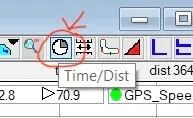
- Choose two laps —> Measures and laps —> Laps:
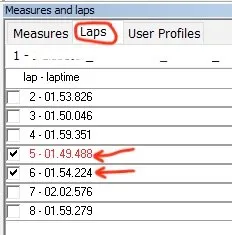
- Time variance should show up in Measures Graph
This is Today I Learned Motorsports is part of a growing collection. Snippets of things I am learning day to day and sharing with you so I don’t forget! Share if you like it. Click here for them all. Sign-up below to never miss the new ones?
Whenever you're ready, here are 2 ways I can help you:
1.
Motorsport Skool — The paddock in your pocket. Nearly every course I've ever done, plus unlimited FREE Tech Q&A from our friendly community.
2.
Master Your Tyres course — Go beyond guesswork and become totally self-reliant to tune and drive your tyres. Get more grip, better handling and faster lap times in any conditions.